

Ever found yourself stuck trying to save a video for later, only to end up juggling shady websites or clunky tools? I’ve been there too, and that’s exactly what led me to write this SurFast Video Downloader Review. After testing countless downloaders, I wanted something simple, safe, and powerful enough to handle everything from YouTube lectures to TikTok clips.
In this review, I’ll walk you through my personal experience with SurFast, the standout features that make it worth considering, and where it might still fall short. Think of this as a chat with a friend who’s already done the heavy lifting—so you can decide if it’s the right fit for your needs. Let’s dive in.
How It Works for Me
I was struggling with saving videos from different platforms. Sometimes I needed a tutorial from YouTube, other times a lecture clip from Facebook or even a short reel from TikTok. I’d bounce between free tools, but most broke after a while or added watermarks. Then I tried SurFast Video Downloader, and honestly, it felt like someone finally made a tool that “just works” without the extra hassle.
What Stood Out to Me?
- Simplicity: No steep learning curve. I paste the link, pick the format, and it downloads—fast.
- Multiple Formats: Whether I need MP4 for editing or MP3 for audio-only files, SurFast handles it with one click.
- Batch & Tracking: I can set it to track a playlist or channel, so new uploads download automatically while I sleep.
- Subtitles & Thumbnails: I loved that it saves subtitles and even grabs video thumbnails. Small touch, but super handy.
- Quality Options: From 1080p to 4K and even 8K, it preserves video quality. Perfect when I need sharp clips for work.
Who Is This Suitable For?
- Content creators who want a reliable way to save videos for editing or inspiration.
- Educators & students who need to archive lectures, tutorials, or research clips.
- Marketers & agencies looking to repurpose content without worrying about resolution drops.
- Everyday users who just want to save a favorite video, song, or clip for offline use.
My Personal Experience
One of the first things I did was download a 2-hour webinar I’d missed. Normally, I’d be nervous about losing connection, but SurFast saved it in full HD without interruptions. Another time, I clipped only the 10-minute section I needed and shared it with my team—it saved me hours.
I also love using the video-to-MP3 feature. I’ll grab a motivational talk from YouTube, convert it to audio, and listen while walking. Once, I even downloaded an entire playlist of tutorials for offline use during a trip—no need to worry about weak Wi-Fi.
The tool has quietly become part of my routine. It’s not flashy, but it works. And that’s what matters.
Pricing
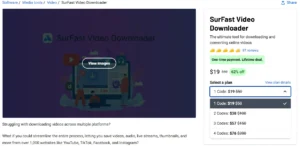
SurFast Video Downloader is available as a lifetime deal, which is what makes it a steal compared to monthly plans. Here’s a quick breakdown:
| Plan | Price | Licenses | Best For |
| Plan 1 | $19 (1 code) | 2 devices | Solo creators or casual users |
| Plan 2 | $38 (2 codes) | 4 devices | Small teams or freelancers with multiple PCs |
| Plan 3 | $57 (3 codes) | 6 devices | Agencies or professionals managing multiple machines |
If you’re just testing it out, Plan 1 is more than enough. But if you plan to use it across several devices (say, work + home PCs), then Plan 2 is the sweet spot. Plan 3 is best if you’re running a small team. See Why I Recommend SurFast!

Pros and Cons
Here’s my honest take after using it regularly:
| Pros | Cons |
| Easy to use, no learning curve | Interface could look more modern |
| Supports 1,000+ websites | Must keep app running for scheduled downloads |
| Multiple formats (MP4, MOV, MP3, etc.) | Desktop-only, no web version yet |
| Download in 8K/4K | Needs better clarity on default formats |
| Bulk downloads & playlist tracking | Device deactivation requires support |
| Subtitles & thumbnail capture | No official mobile app yet |
Should You Buy It?
If you’re someone who downloads videos often—whether for learning, content creation, or work projects—SurFast Video Downloader is worth it. The lifetime deal means you’ll save hundreds compared to subscription tools. It’s perfect for creators, teachers, marketers, and even casual users who just want to save media in the best quality possible.
That said, if you’re looking for a cloud-based tool or something mobile-first, you might want to explore other options. For everyone else, especially those tired of subscription fees, SurFast is a no-brainer. Learn More About SurFast!
FAQ
Q1. What is SurFast Video Downloader and how does it work?
SurFast Video Downloader is software that saves videos, audio, and subtitles from 1,000+ websites. Paste the link, choose the format, and download in seconds.
Q2. Does SurFast Video Downloader support YouTube playlists and channels?
Yes, you can download entire playlists or channels, and even track them for automatic downloads of new videos added later.
Q3. Can SurFast Video Downloader convert video to audio?
Absolutely. It converts video URLs into audio formats like MP3, WAV, and AAC, making it easy to save music, lectures, or podcasts.
Q4. Is SurFast Video Downloader a one-time payment or subscription?
With the lifetime deal, you pay once and enjoy access forever. No monthly fees, just a single payment for all features.
Q5. Can I use SurFast Video Downloader on both Windows and Mac?
Yes, the software supports both Windows and Mac devices, with licenses depending on the lifetime plan you choose.
Q6. Does SurFast Video Downloader support private videos?
Yes, as long as you have access, you can download private Facebook and Vimeo videos by logging into your account through the tool.
Q7. Is SurFast Video Downloader safe to use?
Yes, it is GDPR-compliant and regularly updated to stay secure. You can download videos without relying on risky third-party sites.
Q8. Who should consider the SurFast Video Downloader lifetime deal?
Content creators, educators, agencies, and everyday users who want a simple, cost-effective way to save videos without recurring fees.
Conclusion
If you often find yourself saving tutorials, clips, or songs, this tool fits like a glove. But if you prefer cloud-only tools, you might want to keep looking. For me, SurFast Video Downloader has been a simple, dependable way to manage content across platforms without wasting time or money. It’s not perfect, but like a trusted friend, it gets the job done when you need it most.