Introduction: Tired of Cold Outreach Going Nowhere?
You send a connection request. No reply. You send a follow-up. Silence. You try again. Nothing.
Sound familiar?
LinkedIn outreach can feel like shouting into a void. Most people either give up or keep sending the same copy-paste messages that nobody reads. And hiring a full sales team? That’s not an option for most freelancers, solopreneurs, or small business owners.
That’s exactly why tools like Sbl.so are getting so much attention right now. The Sbl.so lifetime deal is currently live on AppSumo, and people are talking about it — some calling it one of the best LinkedIn automation tools they’ve used.
But is it actually worth your money? Let’s break it down honestly.
What Is Sbl.so?
Sbl.so is an AI-powered LinkedIn outreach tool. In simple words: it finds leads, sends messages, handles replies, deals with objections, and books sales calls — all on autopilot.
You set it up once, tell it who you want to reach, and it does the rest. Think of it like having a smart assistant working your LinkedIn 24/7, even when you’re asleep or on vacation.
It was built by Shubham Kumar and his co-founder Ayush, who were frustrated that most outreach tools just blasted the same generic messages at everyone. Their approach is different — the AI is trained on over a million real sales conversations, so it actually sounds human.
Who is it for?
- Freelancers looking for clients
- Marketing agencies managing LinkedIn outreach for multiple clients
- Sales managers wanting to fill their pipeline
- Solopreneurs doing their own business development
- Consultants who want booked calls without chasing people
Key Features of Sbl.so
Here’s what makes Sbl.so stand out from other LinkedIn tools:
- AI Lead Generation (ICP Leads): Just describe your ideal customer in plain English and the tool builds a targeted lead list for you. No scraping tools, no CSV imports needed.
- Intent Signals: It can find leads who are already showing interest — like people commenting on posts in your niche or liking relevant content.
- Campaign Sequence Builder: Build multi-step outreach sequences with delays, warm-up actions (like profile visits and post likes), connection requests, and follow-ups.
- AI Chat Handling: When someone replies, the AI takes over — handling objections, answering questions, and nudging the conversation toward a call booking.
- Smart Follow-Ups: If a prospect goes quiet mid-conversation, Sbl.so automatically follows up at the right time with the right message.
- Voice Cloning: You can train the AI on your actual voice. It can send personalized voice notes in your tone, not some robotic-sounding clone.
- Unified Inbox: Manage all your LinkedIn conversations from different accounts in one place.
- Lead Scoring: Filter out bad-fit leads before reaching out. Set your ICP criteria and only message people who match.
- Sales Navigator Integration: Already using LinkedIn Sales Navigator? You can import lead lists directly.
- A/B Testing: Test different messages to see what’s actually working.
- Multi-language Replies: The AI can reply in whatever language your prospect uses.
- Multiple Workspaces: Great for agencies managing several clients.
User Experience & Ease of Use
Setting up Sbl.so is pretty straightforward. When you create a campaign, you describe your goal in plain text — what you’re offering, who you want to reach, what you want them to do (like book a call). The system generates the campaign structure for you.
There’s even a Google Doc template (a “scratch pad”) that helps you organize your campaign details before pasting them in. That’s a thoughtful touch.
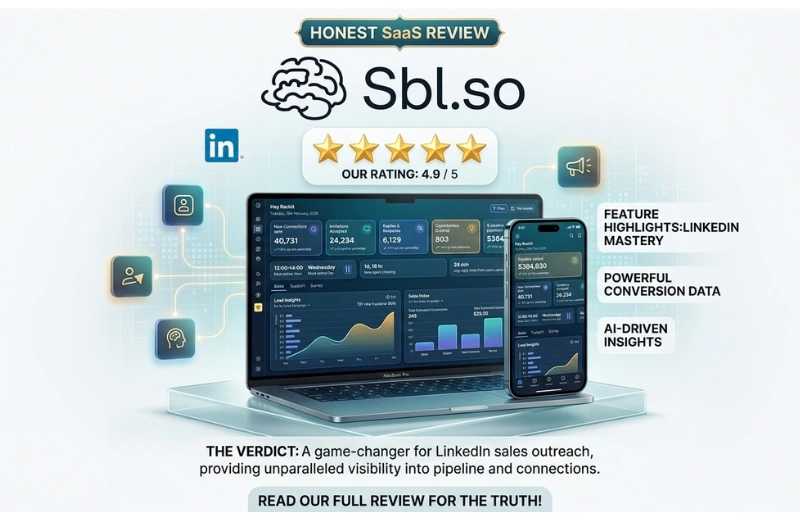
The dashboard gives you a clear view of everything — connection requests sent, replies received, sentiment analysis (who was positive, who had objections, who went cold), and even conversion predictions.
One reviewer put it perfectly: “Every action is clearly laid out, which shows the high level of thought that went into its design. Rarely can I say that I actually ‘enjoy’ using a new software, but this one hits the mark 100%.”
That said, there is a learning curve. The campaign builder has a lot of options, and it might feel overwhelming on your first try. Some settings could use better tooltips or documentation. A few users also mentioned occasional slow loading in the inbox. The team is actively patching these things, but it’s worth knowing upfront.
Real Benefits of Using Sbl.so
Let’s talk about what actually matters — what changes in your day-to-day work.
Save hours every week. Instead of manually sending connection requests, writing follow-ups, and juggling conversations across dozens of threads, Sbl.so handles all of that automatically.
Wake up to warm leads. One user reported a $3,000 pipeline generated in just one week — while he was on vacation in Vietnam. He was eating street food and the AI was booking appointments back home.
Stop missing follow-ups. Most deals are lost because someone forgot to follow up. Sbl.so never forgets.
Scale without hiring. If you run an agency, you can manage outreach across 40+ LinkedIn accounts from one dashboard. That’s serious leverage.
More personal, less robotic. The voice cloning and AI training features mean your outreach sounds like you, not a template.
Things I Liked
- The AI actually handles objections. Not just “thanks for reaching out” templates — it reads the reply and responds intelligently.
- ICP lead generation is genuinely useful. Describe your target customer and get a list back in minutes. No extra tools needed.
- Commenter DM feature is clever. You can target people who commented on a specific LinkedIn post in your niche — basically reaching people who already showed interest in a topic.
- The founders are responsive. Multiple reviews mention how active and helpful the support team is, especially at this price point.
- Retargeting past campaigns. You can take people who had objections in a previous campaign and hit them again with a tailored offer. That’s a smart sales move.
- 60-day money-back guarantee. AppSumo’s standard protection means there’s very little risk in trying it.
Things That Could Be Better
Being honest here:
- ICP filter accuracy isn’t perfect yet. A few users found the lead lists included people who didn’t match their criteria, especially when using exclusion filters like “NOT marketing roles.” The founders have acknowledged this and are working on it.
- Text formatting on LinkedIn. Line breaks in messages sometimes get squashed into one big block of text when sent. It’s a known issue being fixed.
- Manual message detection. If you jump in and reply to a prospect manually, Sbl.so doesn’t always recognize it and may still send the next automated message. This is on their roadmap.
- Learning curve. The platform is powerful, but first-timers may need a session or two before it clicks. More tooltips and onboarding videos would help.
- Credits need monitoring. If you’re scaling up campaigns, keep an eye on your outreach credit balance.
Who Should Use This Tool?
Great fit for:
- Freelancers and consultants who rely on LinkedIn for client acquisition
- Marketing agencies running outreach for multiple clients
- Sales professionals who want to scale without a big team
- Solopreneurs who don’t have time to manually manage LinkedIn
- Anyone doing B2B lead generation regularly
Probably not ideal for:
- People who aren’t on LinkedIn much or whose audience isn’t there
- Businesses that need a white-label solution right now (though the founders say it’s coming soon)
- Complete beginners who’ve never done outreach before and aren’t ready to invest time learning the platform
Comparison With Similar Tools
There are other LinkedIn automation tools out there — like Dux-Soup, Expandi, Lemlist, and Meet Alfred. Here’s how Sbl.so is different:
Most older tools focus on sending messages in bulk. Sbl.so is built around conversation, not just broadcasting. The AI doesn’t just send a sequence and stop — it actually responds, objects, qualifies, and books.
One happy user who switched from Dux-Soup put it simply: they had poor experiences with other outreach tools before, but Sbl.so’s AI handles conversations in a way the others didn’t.
The ICP lead generation feature also sets it apart. You don’t need a separate prospecting tool — it’s all built in.
The main thing Sbl.so lacks compared to some alternatives is a white-label option for agencies (coming soon) and a longer track record, since the company was founded in 2023.
Pricing & the AppSumo Lifetime Deal
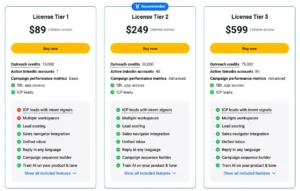
Here’s how the pricing breaks down on the current Sbl.so lifetime deal:
| Plan | Price | Outreach Credits | LinkedIn Accounts |
| Tier 1 | $89 (one-time) | 10,000 | 1 |
| Tier 2 | $249 (one-time) | 30,000 | 40 |
| Tier 3 | $599 (one-time) | 75,000 | 80 |
All tiers include ICP leads, lead scoring, unified inbox, campaign sequence builder, A/B testing, Sales Navigator integration, voice cloning, and the ability to train the AI on your product and tone.
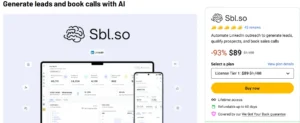
The regular price is $1,188/year — so even the cheapest tier at $89 represents a 93% discount for lifetime access.
For context: a single sales call booked from this tool could easily cover the cost of the entire lifetime deal. If you’re doing any serious volume of B2B outreach, the math makes sense.
Is Sbl.so Worth Buying?
For most people doing LinkedIn outreach — yes, it’s worth it.
The $89 Tier 1 is a low-risk entry point. If you book even one client from it, you’ve paid for the tool many times over. And the 60-day money-back guarantee means you can try it properly without worrying about losing your money.
The tool isn’t perfect — lead accuracy could be better, and there’s a learning curve — but the core functionality works, the team is actively improving things, and the support is genuinely responsive.
If you’re at a larger agency managing multiple accounts, Tier 2 or 3 makes a lot more sense given the higher account limits.
What really sells it is that this isn’t just another message blaster. It’s closer to having an AI sales rep that holds actual conversations for you.
Final Verdict
Sbl.so is one of the more interesting tools to land on AppSumo in a while. It takes a real problem — LinkedIn outreach is time-consuming, repetitive, and easy to do badly — and genuinely tries to solve it with smart AI.
Is it perfect? Not yet. But the direction is right, the team is listening, and the value at the current lifetime deal price is hard to argue with.
If you rely on LinkedIn for business development and you’re tired of doing everything manually, this is worth a serious look.
👉 Check out the Sbl.so AppSumo Lifetime Deal here
Frequently Asked Questions (FAQ)
Q1: What is the Sbl.so lifetime deal? The Sbl.so lifetime deal is a one-time payment offer available on AppSumo that gives you permanent access to the Sbl.so platform — no monthly fees. Plans start at $89 for Tier 1.
Q2: Is Sbl.so safe to use with LinkedIn? Sbl.so includes smart safety features like automated warm-ups, IP rotation, and human-like behavior patterns to reduce the risk of LinkedIn account restrictions. That said, any automation tool carries some risk with LinkedIn’s terms, so using it responsibly is always recommended.
Q3: Do I need LinkedIn Sales Navigator to use Sbl.so? No, Sales Navigator is optional. Sbl.so has its own built-in ICP lead generation tool. Sales Navigator integration is available for users who already have it and want to import their own lead lists.
Q4: Can Sbl.so reply to messages in different languages? Yes. The AI can reply in any language, which is helpful if your prospects are in different countries.
Q5: How many LinkedIn accounts can I connect? It depends on your plan. Tier 1 supports 1 account, Tier 2 supports up to 40, and Tier 3 supports up to 80. This makes higher tiers well-suited for agencies.
Q6: Is there a free trial? There’s no standalone free trial, but AppSumo offers a 60-day money-back guarantee. That’s essentially a two-month trial with full access — risk-free.
Q7: What kind of businesses benefit most from Sbl.so? B2B businesses get the most value. Agencies, consultants, SaaS founders, coaches, and anyone who sells services or products to other businesses through LinkedIn will find the most use for it.
Q8: How long does it take to see results? Results vary depending on your offer, ICP targeting, and how well you’ve trained the AI. Some users reported their first call booked within 48 hours. Others took a couple of weeks to see meaningful traction. In general, the better you define your ideal customer profile, the faster the results tend to come.